2013年6月27日星期四

【Final Work】--- Rationale

RATIONALE

Starting out in photography is a wonderful time full of creativity and discovery. Unfortunately, for the "baby photographers" like me, I had never play with a digital camera and it was very interested and very new to me. Throughout this three months, I had learnt about the basic skills of how to use a camera. By using the skills I had learnt throughout this few months, I had captured five final pictures for my project.

For the final assignment, we have to choose a topic that interest and shoots with the photographic skills that we have gained through the semester. At first, I felt quiet hard for this assignment as I live in the hostel and there are only very less chance for me to go out and take photos. Besides that, I am also unfamiliar with this place so I do not know the place to take photos.

After two weeks, I finally settle down my theme which is ‘ Hawker Stall’ as I have a chance to go accompany my friends to her aunt hawker stall which located at Masjid Jamek. The hawker stall is at the corner of many skyscrapers. Although it looks tiny at the corner, many workers from companies went there to have their lunch. The food is easy preparing and delicious to eat. The business of the hawker stall is good as it located beside a college and near the bank. It was very hot when you take photo at the hawker stall no matter how cool the weather is as there is no fan at the hawker stall. Although it is hot, in order to finish my assignment, I went to the hawker stall three times to take pictures of it.


At last, I had my final five pictures for the final project and I felt very happy that I have the chance to take those pictures. Besides that, I feel very happy of the knowledge that I have learnt on the subject of introduction of photography in this few months. It really enrich my life and I am looking forward to learn more.

【Week 11】--- Final Project II

For the next tutorial session, I went to the hawker stall and take more shoots. The hawker stall located at Masjid Jamek. It is very far away from the campus. The first time I went to the hawker stall because I accompany my friends to her aunt hawker stall. After the first time I went to the hawker stall, I took many shoots for the my final project. After that, I went to the hawker stall for about three time to take the more shoots.
Here are the pictures for my final project,


【Week 10】--- Final Project I

This few weeks, we have our final project coming on. Mr. Vinod told us that we have to post three different topic that we had chose for our final project topic. For the topic, I am very worried of it as I dont know what to do for the final project. At last, I took the photos for the water pipes, but Mr. Vinod took me to retook the photos and change my topic.
At last, I change my topic to the hawker stall.
Here is some of my pictures of the hawker stall.


【Week 5】--- The Zone System

In this class, we have learn about the zone system. The first thing you need to know is that exposure meters are dumb, really dumb.
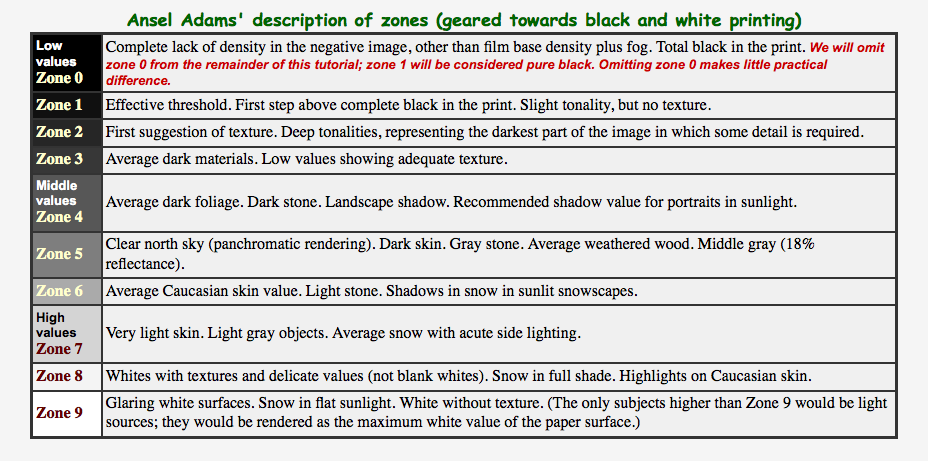
 They are clueless about what they're photographing. They assume that all scenes have the same average tonal value— middle gray— roughly zone 5 in the chart below. 

If a scene is different, for example a snow scene, it will be exposed incorrectly. It will come out middle gray— underexposed.
If you follow the meter's reading, every scene will have the same average middle gray density. You'll get lots of bad exposures.

Ansel Adams developed the Zone system. His technique was to carefully study a scene, visualize the final print, then determine the correspondence between portions of the scene and tones in the print. He would then meter, expose the image.
Digital photographers must be ever vigilant; they must pay attention to highlights when setting exposure.
You can correct color, adjust contrast, and apply tonal response in software
The key to the Zone system is visualizing how you want areas of the scene to appear in the final image, or in the language of the Zone system, where you want to "place" them.
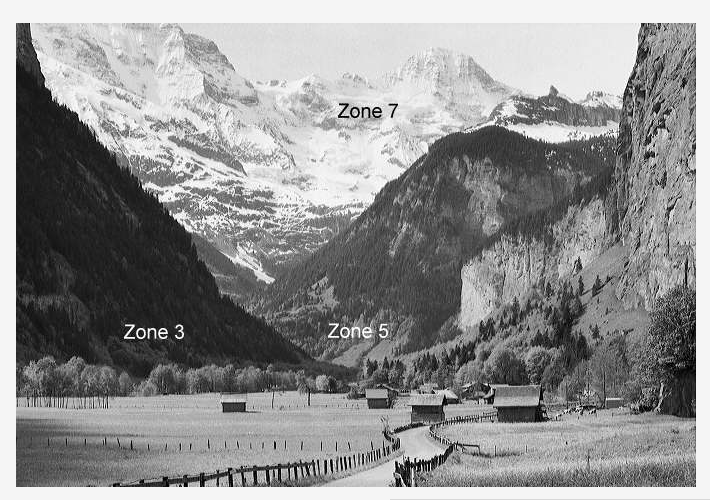
The Zone system can then be expressed in a single statement: Select an area of the scene, meter it, then adjust the exposure by the difference between the zone you want in the final image and zone 5 (middle gray).  


For example, suppose you want to place the snowy mountains in scene below at zone 7. Meter them, then increase the exposure by two f-stops, i.e., if the meter says 500 at f/16, expose at 250 at f/11. 


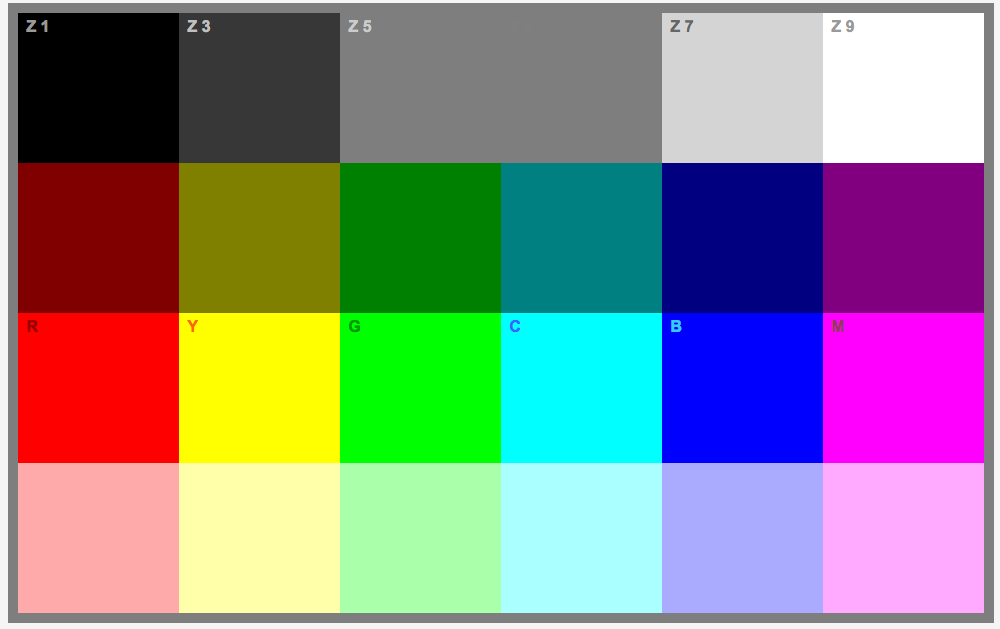
For this class, we have to do two exercise, for the first exercise, we have to choose 3 different subject matters of varying tones.
Tint, Tone & Shade
Photograph:
1.An Image that has different shades of White
2.An Image that has varrying shades of grey (middle tones)
3.An Image that has varying shade within a dark area.
This is the exercise that I did for this class.


This exercise allow us to know that the camera will adjust the colour of the area that we want to take picture and we can adjust it a bit to let it looks like that same with the original color.
In this exercise I had learnt that we can change the aperture, ISO, shutter speed to try to take a good shoots.

【Week 4】--- ISO and Shutter Speed

The third lesson that we have learn is the ISO and shutter speed.

ISO is the number indicating a digital-camera-sensors sensitivity of light.
The higher the sensitivity, the less light is needed to make an exposure.
Shooting at lower ISO number requires more light than at a higher number.


This is the figure of how the aperture react on a camera.

Shutter speed is the duration of time of shutter remains open to allow light to reach the digital camera sensor.
It's measured in seconds,or fractions of seconds.
Using very fast shutter speeds to "freeze" fast moving objects.
Slow shutter speeds are used to intentionally capture the movement of a subject.
For most, shutter speeds below 1/60th of a second often required use of a camera support to prevent camera shake.


For this lesson, we did the exercise of the ISO and let the shutter speed and the aperture remains constant and  just change the aperture and will saw the different of the ISO.
Here is the exercise that I did for the ISO and the shutter speed,

f/5          ISO 200 1/8

f/5          1SO 400                1/8

f/5          ISO 800 1/8

f/5          ISO 3200               1/8

f/5       ISO 3200              1/8

The second exercise of the ISO and shutter speed is to change the ISO and shutter speed so that the pictures can remain in the same exposure.
Here is my second exercise of the ISO and shutter speed,

f/5          ISO 200 1/8

f/5          1SO 400                1/15

f/5          ISO 800 1/30

f/5          ISO 1600               1/60

f/5          ISO 3200               1/125


After that, we have to do the shutter speed exercise at home, so I did it at my friend hostel room as my hostel's fan cannot function at all. At the first time, I did wrong for the fan exercise. But after that I have retook the picture with the same exposure I it is correct. I am so happy with it.

In this exercise, I had learnt that if we want to that a picture that show someone moving, we can change the shutter speed longer. Like that, our picture will not look like someone stuck there in the photo.
Besides that, ISO also plays a important part in this exercise.


【Week 3】--- Aperture

Today, we learn about the aperture of the camera. An aperture is a hole or an opening through which light travel. The aperture determines how collimated the admitted rays are,which is of great importance for the appearance at the image plane. Aperture controls the amount of light entering the lens and controls depth of field in your camera.

When aperture is big, the background of the picture is clear.
When aperture is small, the background of the picture is blur.

A lens typically has a set of marked called "f-stops". It's refers to the focal length of the camera.

 
When the aperture is big, the light going through the camera is less.
When the aperture is small, the light going through the camera is more.


In this lesson, we have to do two exercise that use our camera and the aperture of the lens. The lessons told us about how to use the and the different between big aperture and small aperture.

This is the first aperture exercise that about the size of the aperture that affect the light of the picture.
Here is the exercise I did,
f/5      1SO 200                1/500

f/5.6          ISO 200           1/500

f/8    ISO 200                    1/500

f/11        ISO 200 1/500

f/16        ISO 200 1/500

f/22        ISO 200 1/500

f/32        ISO 200 1/500

The second exercise is about when we turn the aperture to a big size, we can still control the shutter speed to have the same exposure.
Here is my second exercise,

f/5          ISO 200 1/500

f/5.6      1SO 200                1/400

f/8          ISO 200 1/200

f/11        ISO 200 1/100

f/16        ISO 200 1/50

f/22        ISO 200 1/25

f/32        ISO 200 1/13

In this exercise, I learn about one of the function on the camera. I felt quite fun when I first time turn my camera from auto to manual. Now only I know what is the aperture of a camera and use it whenever and wherever I want to take a picture.

--- Aderline ---
---  19.04.2013 ---